
An INKY Security Add-On
INKY Email Signatures: Consistent, Compliant Branding on Every Email
One signature service. Centrally managed. Built on the email security platform you already trust.
Every email your staff send is a small piece of marketing – and, for many businesses, a piece of legal compliance. A polished, consistent email signature builds trust with recipients, reinforces your brand, and keeps you on the right side of disclosure rules.
But creating, deploying and updating signatures across an organisation is a constant administrative chore. Different fonts on different devices. Out-of-date phone numbers. Missing legal footers. Marketing campaign banners that never quite make it to everyone’s inbox.
INKY Email Signatures, delivered and managed by Approved Systems, takes the hassle out of signatures by managing them centrally on the same trusted INKY platform that already protects your email from phishing.
What INKY Email Signatures Does
A single, server-side signature engine for your whole organisation.
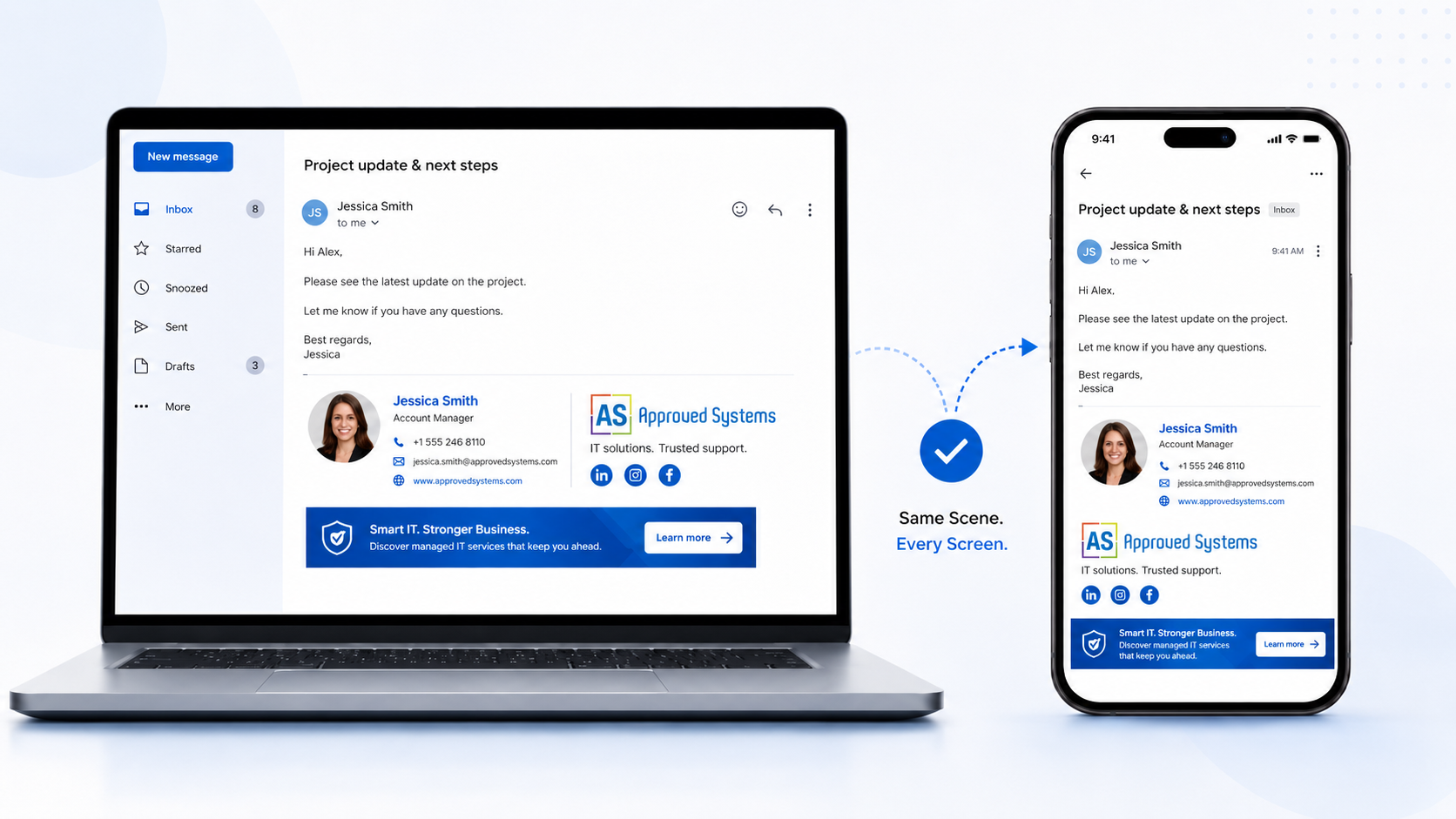
Same Scene on Every Screen
Signatures render correctly in every email client and on every device – desktop, webmail, mobile.
Centralised Management
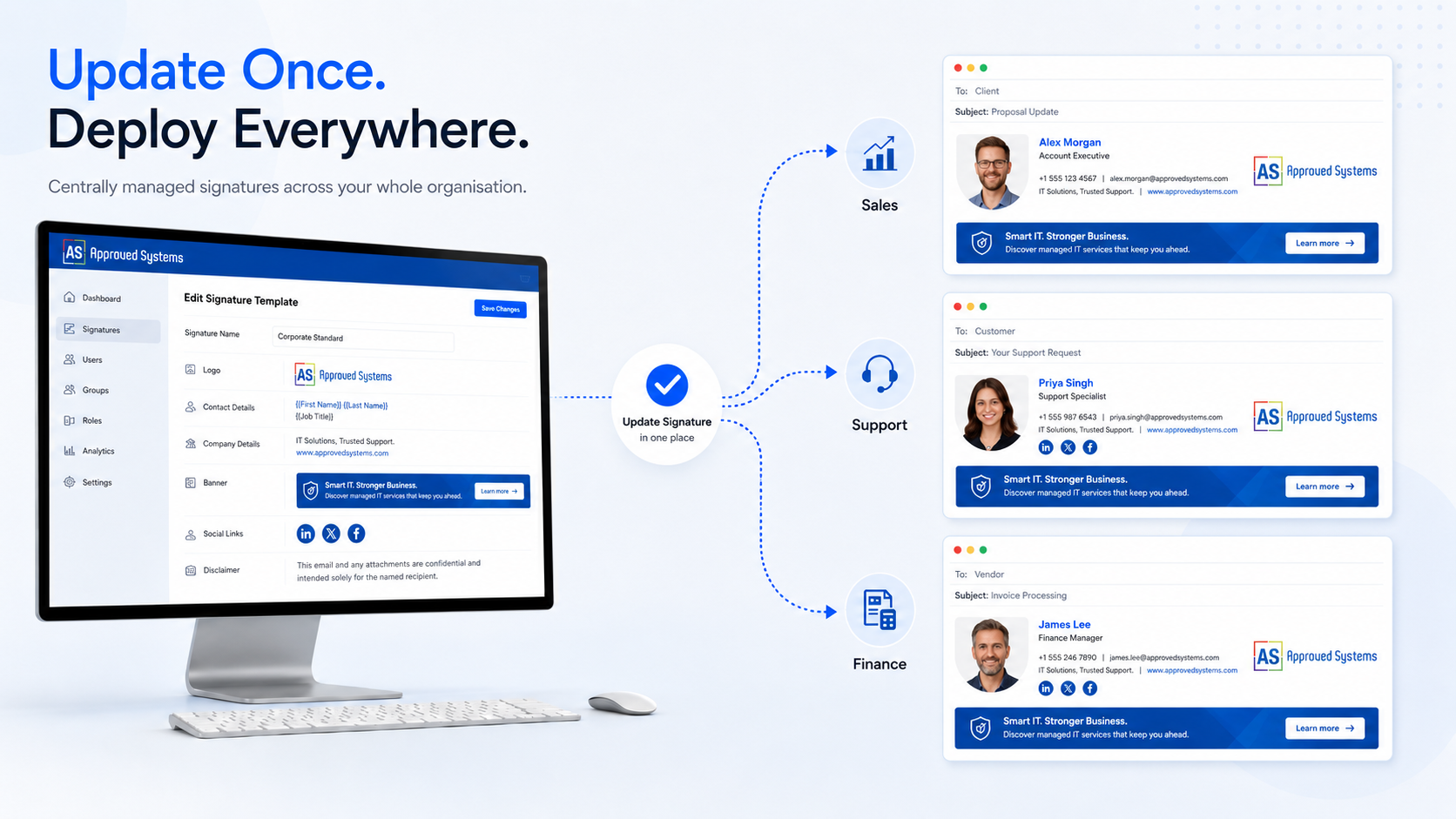
Update once, deploy everywhere. New disclaimers and campaign banners go live across the whole organisation instantly.
Multiple Brands & Departments
Profiles and personalised layouts support multiple brands, locations, or departmental requirements.
Built-in Compliance
Apply mandatory legal disclaimers and footers to every outgoing email automatically.
Delegate Without IT Access
Let marketing or HR manage signature content without giving them broader dashboard or security access.
SOC 2 Type II Certified
Built on the same security-certified platform that already protects your inbound, outbound and internal email.
Same Scene on Every Screen
Anyone who has tried to roll out a company-wide signature knows the frustration: it looks right in Outlook on the laptop, broken on the iPhone, and missing the logo entirely on someone’s Android device. Until now, consistent rendering across email clients has been an unsolved problem.
INKY solves it by reconstructing every email at the server, so the signature is delivered exactly as designed – in every email client, on every device, every time. Your brand looks the same to the recipient whether your staff sent the email from their desk, their phone, or webmail.
Update Once, Deploy Everywhere
When legal hands you a new disclaimer or marketing wants to push a new promotional banner, you shouldn’t have to chase every staff member to update their own signature. With INKY, you make the change once in the dashboard and it applies to every outgoing email across the organisation immediately.
That makes life easier for:
- Marketing – campaign banners and promotional links
- Legal & compliance – mandatory disclaimers and footers
- HR – new hire onboarding and template management
- IT – one less manual process to babysit
Profiles & Personalised Layouts
Many organisations operate more than one brand, run multiple offices, or have departments with very different communication needs. INKY supports this with signature profiles – multiple signature configurations that you can apply to different groups of users.
Within each profile, personalised layouts let users mix and match individual signature elements while staying inside the brand guidelines you set. That means consistent branding at the organisation level, with the flexibility teams actually need at the individual level. Elements you can include:
- Contact information and job title
- Company logo and brand imagery
- User profile photos
- Social media links
- Call-to-action links and promotional banners
- Legal footers and disclaimers
Advanced Features for Larger Deployments
Enterprise-grade controls included with the service.
Signature Managers
Delegate signature administration to marketing, HR or department leads – without giving them access to the broader INKY dashboard, security settings or reporting. They can update content; you keep control of the rest.
Sent Items Folder Update
Microsoft 365 users can see their signature applied in their own Sent Items folder – not just on the recipient’s side – so they know exactly what went out and how it looked.
Plain-Text to HTML Upgrade
Plain-text emails that would otherwise strip out logos and formatting are automatically upgraded to HTML, so signatures and security banners render properly every time.
Built on the INKY Security Platform You Already Trust
Every additional vendor in your email pipeline is another company touching your messages, another contract to manage and another potential point of failure. INKY combines email security and email signatures into a single service so you don’t have to add a separate signature provider to your supply chain.
If you’re already running INKY for email security, adding Email Signatures is a quick add-on. You get:
- One platform for security and signatures
- One vendor relationship, one bill
- Faster email delivery (one less hop)
- SOC 2 Type II certified security controls
- Microsoft 365 and Google Workspace support
- Implementation in minutes, not weeks
Why Approved Systems
INKY Email Signatures is powerful technology, but like everything else in IT it pays off most when someone else runs it for you. Approved Systems delivers INKY as a fully managed service from our base in Canberra, with:
- Setup, configuration and rollout handled for you
- Signature template design and branding assistance
- Ongoing changes managed on your behalf
- Local Australian support, Mon–Fri
- Bundled with your other Approved Systems services
- 20 years of IT services experience behind every deployment
Get Started with INKY Email Signatures
Bring consistent branding, automatic legal compliance and central control to every email your business sends – on the same secure platform you already trust for inbound threat protection.
Frequently Asked Questions
Do I have to use INKY for email security to use Email Signatures?
INKY Email Signatures is designed as an add-on to INKY’s Inbound Mail Protection. The biggest wins – vendor consolidation, faster delivery, integrated security – come when both run together on the same platform. If you’re not yet on INKY for security, talk to us and we’ll scope both at the same time.
Does INKY Email Signatures work with Microsoft 365 and Google Workspace?
Yes. INKY supports both Microsoft 365 and Google Workspace. A few advanced features – such as updating signatures in the Sent Items folder – are specific to Microsoft 365.
How is this different from the built-in signature feature in Outlook or Gmail?
Built-in signatures live on each user’s device and have to be set up individually. They look different on different clients, often get out of date, and can’t enforce legal disclaimers. INKY applies signatures centrally on the server, identically across every client and device, and lets administrators push updates to the whole organisation at once.
Can different departments or brands have different signatures?
Yes. INKY uses signature profiles for this. You can configure multiple profiles – one per brand, location or department – and assign users or groups to each. Within a profile, individual users can personalise their own contact details and photo while staying inside the templates you define.
Can our marketing team manage signatures without getting access to the security side?
Yes – that’s exactly what the Signature Managers feature is for. You can grant marketing, HR or department leads permission to edit signatures and upload images without giving them access to the broader INKY dashboard, security settings or threat reporting.
Will signatures render correctly on mobile devices?
Yes. Because INKY reconstructs each email server-side, the signature is delivered with consistent formatting to every email client and device – including iOS and Android mobile mail apps.
How quickly can it be deployed?
For existing INKY customers, Email Signatures can typically be enabled within an hour. For new deployments, we’ll work with you to set up the platform, design your signature templates, and roll it out to your users. Most rollouts are complete within a few business days.
Is the platform secure?
INKY adheres to stringent security protocols, including SOC 2 Type II certification. It’s the same platform trusted by Approved Systems’ clients for inbound phishing protection and email encryption.